Agent Toolkit: my AI setup for turning the terminal into an agent workspace
I built an open-source installer to configure Claude Code, Codex CLI, OpenCode, Gemini CLI, Graphify, GSD and my development skills with one command. More than tooling, it is a way to standardize AI workflows in the terminal.
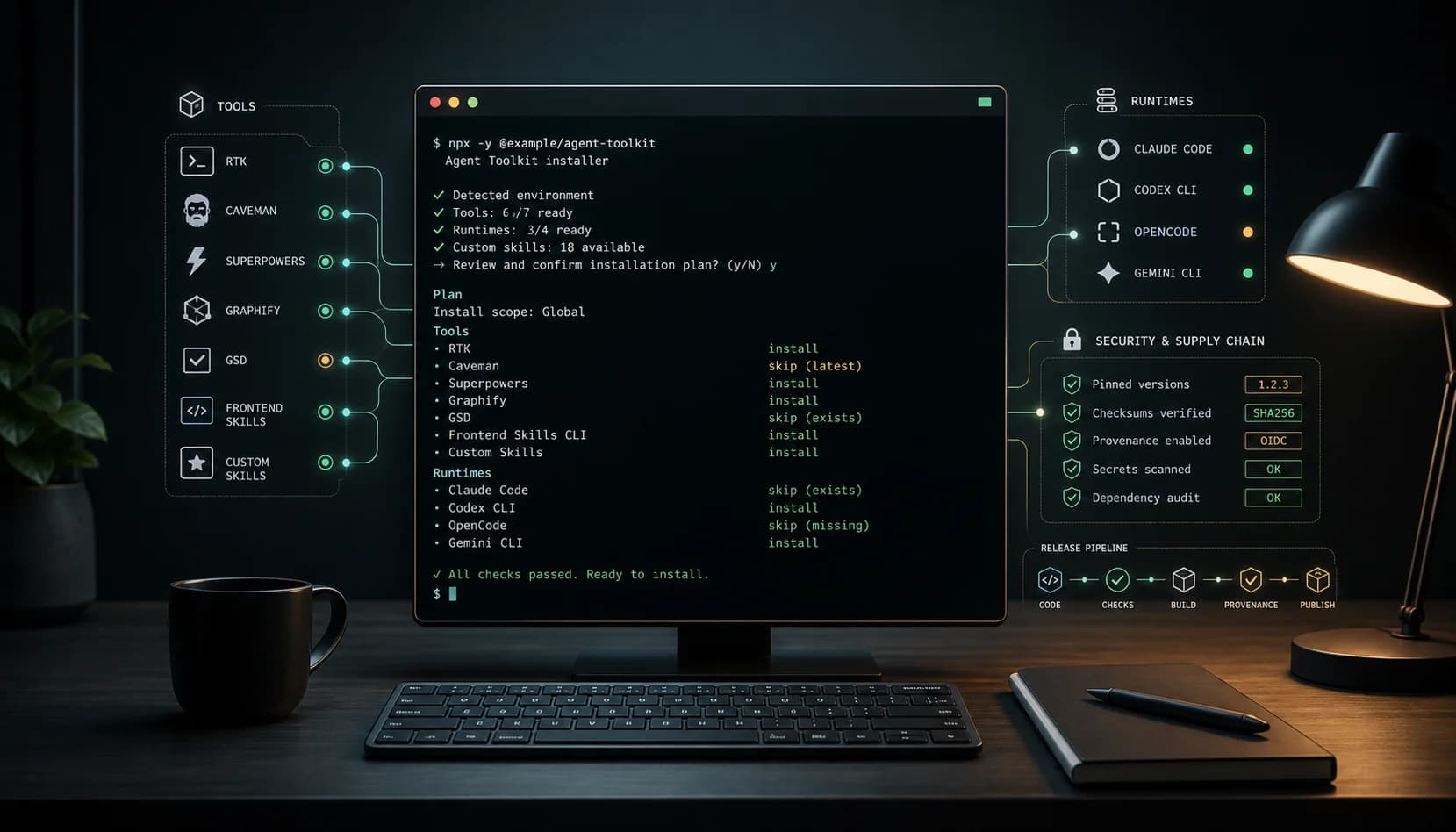
Over the last few months, a growing part of my work has moved out of the editor and back into the terminal.
Not because the editor stopped mattering. But because the most useful coding agents today are not just autocomplete with a nicer UI. They read the project, execute commands, edit files, run tests, create commits and need to operate in the same environment where the software actually lives.
The terminal has become a runtime for AI agents.
That created another problem: every machine, every runtime and every agent started with a different setup. Claude Code one way. Codex CLI another. OpenCode somewhere else. Gemini with another convention. Skills scattered around. Tools installed manually. Context duplicated. And in the end, I was spending too much energy preparing the environment before doing the actual work.
That is where Agent Toolkit came from.
The problem: AI workflows without a foundation become improvisation
Using AI to build software is no longer new. The hard part now is doing it consistently.
At first, my workflow was simple:
- open an agent
- explain the project
- remember which tools were available
- copy old instructions
- install a skill manually
- run some validation
- repeat everything in another runtime later
That works for a few days. Then it becomes noise.
The problem was not one specific agent. It was the lack of a reproducible foundation. I wanted to open a new project, or a new machine, and quickly reach the same environment: tools, skills, workflows, validation and basic security standards.
I did not want a "magic prompt". I wanted an operational setup.
What Agent Toolkit is
Agent Toolkit is an open-source installer that configures my coding-agent workspace with one command:
npx -y @ranimontagna/agent-toolkit
It installs and configures the tools I use to work with agents in the terminal:
| Area | What it is for |
|---|---|
| RTK | Token-aware shell proxy for agent sessions |
| Caveman | Shorter, more direct response modes |
| Superpowers | Planning, TDD, debugging, review and delivery workflows |
| Graphify | Queryable graph of code, docs and project context |
| GSD | Phase-based planning, execution and verification |
| Frontend Skills | External design skills installed from pinned sources |
| Custom Skills | Skills bundled in the repository, organized by technical domain |
And it is not tied to a single runtime. Today the toolkit targets:
- Claude Code
- Codex CLI
- OpenCode
- Gemini CLI
The idea is simple: I choose which tools and runtimes I want to configure, see what the machine already has, review the final plan and only then install.
Why this is not just an install script
A script that installs dependencies is useful. But Agent Toolkit was built to solve a layer slightly above that: workflow.
The point is not only "having Codex installed" or "copying a few skills". The point is to standardize how a project becomes ready for agents to work with quality.
That involves:
- detecting what is already installed before doing anything
- avoiding unnecessary reinstalls
- separating global and local installation
- allowing granular skill selection
- keeping external sources pinned
- preserving licenses and credits from third-party skills
- running validation before publishing new versions
- publishing to npm with provenance
That last part matters. When you install something that configures tools in your development environment, supply chain matters.
That is why the project uses pnpm, a lockfile, audits, CI, secret scanning, fixed versions in tools.lock.json and publishing through GitHub Actions with provenance. It is not perfect security, but it is a much better baseline than blindly running curl | bash without knowing what changed.
The intent was to treat security as part of the workflow, not as a footnote in the README.
Today CI runs quality checks, dependency auditing, dependency review on PRs and Gitleaks over the repository history to reduce the risk of leaked secrets. Installation uses pnpm install --frozen-lockfile, the audit path runs with lifecycle scripts disabled and external sources are declared in tools.lock.json.
Mutable sources are blocked by default too. Overrides such as @latest, npm packages without a fixed version or GitHub sources without a full commit SHA do not pass unless explicitly allowed. In some cases, such as binary downloads, the installer also validates checksums before extraction.
That kind of care matters because Agent Toolkit is not just installing a project dependency. It configures CLIs, skills and files in directories used by agents. If a tool changes the environment where other agents will operate, it needs to be more careful about source, version, validation and publishing.
The most valuable part: Custom Skills
The feature that grew the most is the Custom Skills system.
Today the repository includes skills organized by package:
skills/
  core/
  backend/
  frontend/
  general/
  devops/
Inside that structure, there are skills for things I use or want close at hand frequently:
- Fastify
- API design
- Postgres
- Docker
- Go
- Java
- Kotlin
- Python
- React
- React Native
- Astro
- accessibility
- UI/UX
- code review
The important detail: the user does not need to install everything.
You can list what exists:
npx -y @ranimontagna/agent-toolkit --skills-list
You can install only backend:
npx -y @ranimontagna/agent-toolkit \
  --skills-only \
  --codex \
  --skills-package backend
You can install only Python:
npx -y @ranimontagna/agent-toolkit \
  --skills-only \
  --codex \
  --skills-scope backend/python
Or a single skill:
npx -y @ranimontagna/agent-toolkit \
  --skills-only \
  --codex \
  --skills-path backend/python/python-testing
That changes the relationship with context. Instead of depending on a huge conversation explaining patterns, I can install specific instructions for the runtime I am using and let the agent operate with better vocabulary from the beginning.
The terminal as a cockpit
One thing became clear while building Agent Toolkit: the terminal is becoming a kind of cockpit for AI-assisted development.
It is not only where you run git status.
It is where you:
- install agent runtimes
- inject skills
- run verification
- query the project graph
- execute plans
- publish packages
- validate supply chain
- inspect the real repository state
That fits very well with how I like to work. The agent can suggest, edit and execute, but the terminal remains the concrete boundary between intent and real change.
And that boundary needs to be readable.
That is why the installer uses a visual menu with Clack. It shows detected status, lets you choose tools, runtimes, installation scope and skills, and displays a plan before changing anything.
The goal is not to hide complexity. It is to make complexity navigable.
What I learned building it
This project started small: a way to install a few tools I used.
But it quickly became an exercise in workflow engineering.
Some decisions that looked like details made a real difference:
- do not install blindly: detect first, install later
- separate owned skills from third-party skills: credit and license matter
- pin external sources:
@latestis convenient but dangerous - make security part of the workflow: leak scanning, auditing and provenance should be on the default path
- publish through npm: one universal command beats long documentation
- support multiple runtimes: people use agents in different ways
- keep skill selection granular: too much context also hurts
That last point is underrated. When we talk about AI, the instinct is to add more context, more instructions, more tools. But agents also suffer from excess context. Installing only what makes sense for the current project keeps the workflow cleaner.
How to try it
If you want to test it:
npx -y @ranimontagna/agent-toolkit
Or, if you want to target a specific runtime:
npx -y @ranimontagna/agent-toolkit --all --codex
To install everything for all supported runtimes:
npx -y @ranimontagna/agent-toolkit --all --all-runtimes
And to inspect the available skills:
npx -y @ranimontagna/agent-toolkit --skills-list
Repository:
github.com/raniellimontagna/agent-toolkit
npm package:
npmjs.com/package/@ranimontagna/agent-toolkit
Conclusion
Agent Toolkit is not an attempt to create "the definitive setup" for everyone.
It is my setup, turned into a reproducible tool.
But I believe the direction is bigger than the project: the next productivity jump with AI will not come only from better models. It will come from better environments. Environments where context, tools, skills, verification and security are part of the workflow from the start.
Coding agents are getting good. The question now is whether our workflow is getting good enough to use them properly.
This project is my practical answer to that.
And it is still far from "finished". The UX can improve, more skills can be added, tests can cover more environments, the security model can be made more explicit and the way runtimes share context can keep getting refined.
That is why the repository is open to suggestions, issues and PRs. If you use agents in the terminal and have an idea, a useful skill, a broken case or a security concern, it is probably worth opening a conversation.
If you work with Claude Code, Codex CLI, OpenCode, Gemini CLI or are building your own terminal-agent workflow, try Agent Toolkit and tell me what is missing. This kind of tool improves much faster when it comes from real usage.